Patron operations for experience venues
Turn a good visit into the next one.
Wayside is patron operations software for experience venues. It joins bookings, purchases, memberships, visits, and messages on one patron record. Nothing to rip out: your POS and booking tools keep their own records.
20 minutes · Adam or Jake · reply within one business day Bring one real reservation, visit, or membership change. Leave with a one-page map of where your guest record breaks and the first connection worth testing.
Why revenue plateaus
Every system has a fact. Nobody puts them together.
At 10:30, Avery’s booking, lunch order, waiver, and remaining visits sit in four records. Staff match them by hand while Avery waits. None of those systems care whether Avery comes back.
Owners already know how to deliver a good day. Growth stalls when every booking, purchase, and visit lives in a separate tool and every patron leaves as another one-off transaction. The next dollar comes from the guest who is already here: the renewal before the visits run out, the new beer on tap, the family invited back after the company party.

Production · Aug 14, 2026
The first map was drawn on a working property.
The Acres runs mini golf, a driving range, food and drink, events, and memberships. Each transaction lived in its own tool; no screen assembled a guest’s visit. Seven Wayside modules run there today.
- 751
- Active patronsReachable by name, with their history
- 90
- Event inquiriesEach tied to the people who came
- 22
- Paid membershipsRenewal dates on the record
Live patron, membership, and event records, with Clover commerce and Select Pi range activity feeding them.
Read the field report →Wayside at work
Join the records. Show the arrival. Record what followed.
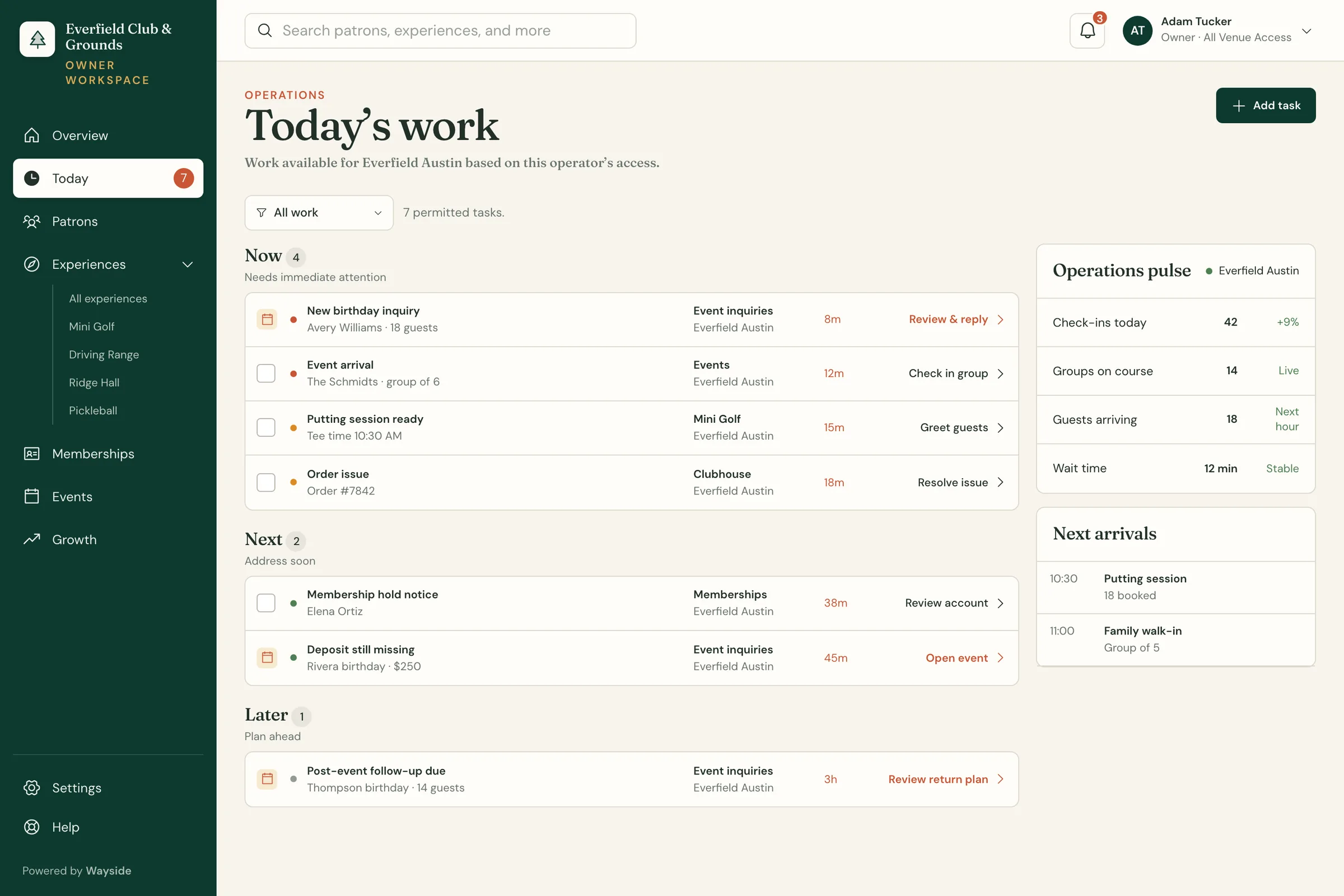
Each provider keeps its own record. Wayside pulls together what the next person needs and keeps track of what happened next.
-
CONNECT
Orders, activity, and bookings arrive with their source
Clover keeps the order. Select Pi keeps the bay session. The booking tool keeps the reservation. Each one arrives with its owner and timestamp intact.
-
RECOGNIZE
Identity, membership, and recent visits resolve on arrival
Whoever greets the guest, at the door, the register, or the bar, sees who is walking in, what they have access to, and what they did last time.
-
ACT
The operator chooses the next move
A welcome, a renewal, an invitation back. Wayside prepares the draft; the owner or shift lead edits, approves, defers, or skips it. Once a workflow has proven itself, they approve it for a whole segment and review the exceptions.
-
MEASURE
The owner sees what moved the business
The approved action, the patron's response, and the next recorded visit sit on the same record, each with its own time.
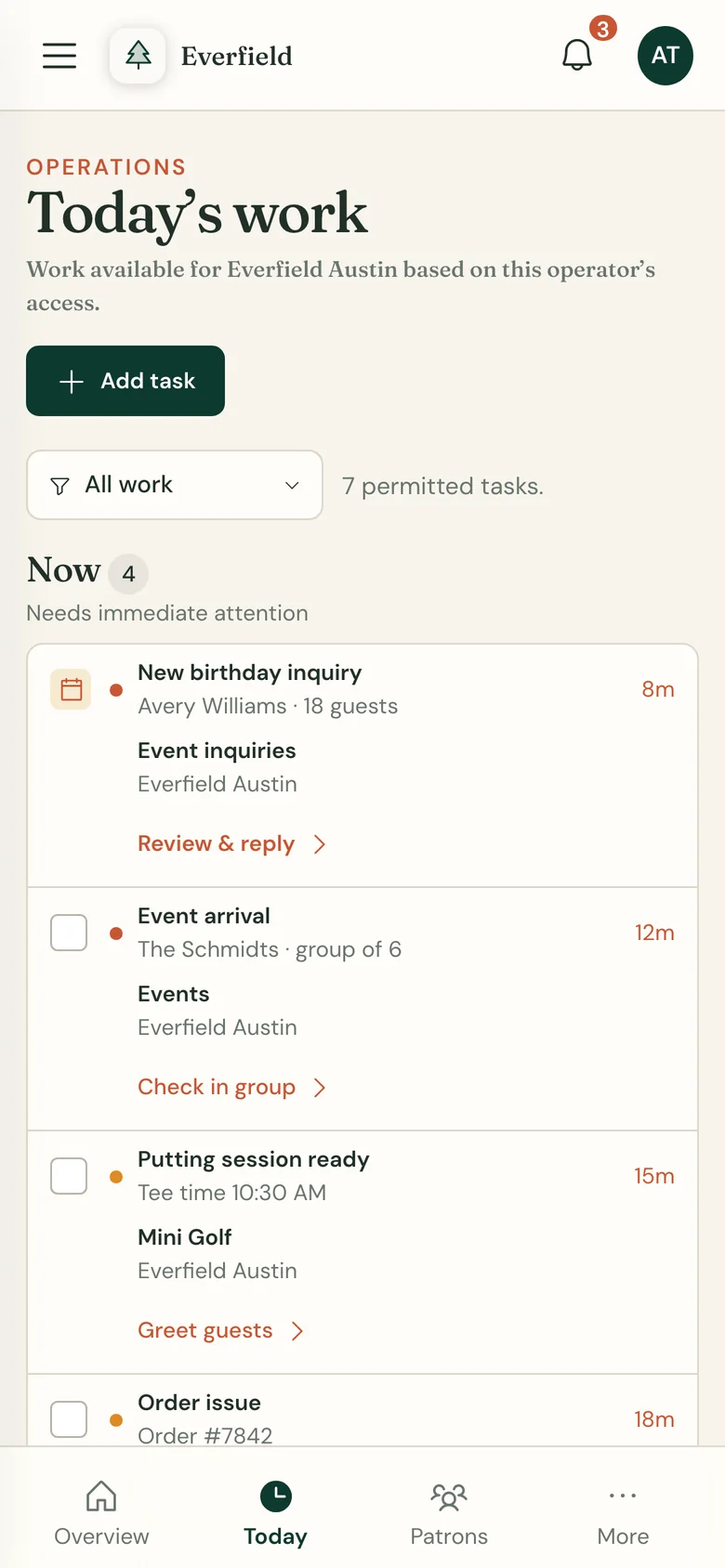
THE OPERATOR'S SIDEToday's work, on a phone for the shift.
THE PATRON'S SIDEWhat Avery receives, and the reply that lands back on the record.
Connect what exists
The POS, booking tool, and waiver system stay authoritative. Wayside attaches their approved activity to one patron record.
Create what’s missing
Where a booking flow, membership, or patron-facing experience is weak, Wayside builds that piece without replacing the rails.
Handle what happens next
The Return Worker prepares the next action for operator review and keeps the result with the patron.
Operator control
Approve one draft at a time. Then approve the workflow.
Wayside prepares the draft. The owner or shift lead chooses the wording, the timing, and whether anything sends.
Watch it work for a while. Then approve the welcome for every first-time family, or the renewal for every member with two visits left, and review only the exceptions.
A few useful answers
Before we map your venue.
The short version of the platform, the connections, and how work starts on your property.
What is Wayside?
Wayside is patron operations software for experience venues. It joins bookings, purchases, memberships, visits, and messages on one patron record, giving staff the history behind a guest's arrival and operators a place to choose the next action.
Find your kind of venueDoes Wayside replace our POS or booking system?
No. Your POS, booking, and waiver tools keep their own records. Wayside joins approved activity from those systems around one patron; venue modules add the operating surfaces your property needs.
See the venue modulesWhich systems connect to Wayside?
Clover, Select Pi, Square, Stripe, Google Workspace, and Mailchimp are connected integrations, activated per venue. Each connection has venue-approved access, a defined set of fields, and a test on your property.
Explore the connection boardWho decides what gets sent to a patron?
The Return Worker prepares a welcome, renewal, invitation, or follow-up from recorded patron activity. The owner or shift lead approves, edits, or skips it. Responses and later visits stay with the decision as the venue records them.
See the return workflowWhere is Wayside running?
Wayside runs at The Acres in Cincinnati, where mini golf, a driving range, food and drink, events, and memberships share one property. Clover commerce and Select Pi range activity feed the patron record.
Read The Acres field studyHow do we get started?
Start with a 20-minute working session with a Wayside founder. Bring the systems you run and one real reservation, visit, or membership change. Leave with the first connection worth testing mapped out.
Map your venueA good day shouldn’t disappear when the doors close.
Map your venue in 20 minutes.
Request a session →A working session with Adam or Jake. Bring one real booking, visit, or membership change; leave with the broken handoff marked. Personal reply within one business day.